

About 10–12 minutes end to end: install the skills,
add the MCP server, paste one prompt. You should get a failing score
(~33/100) on purpose, then flip one line and go green.
- Examinee — a clone of the agent under test. It works a real task against digital twins of GitHub and Slack (deterministic fakes with the same API shapes as production), and every tool call is recorded.
- Coach — your Cursor session. It installs, connects, launches the run, and brings the results back into the conversation.
- Judge — Pome’s scorer. It reads the recorded trace and grades it against the task’s acceptance criteria, 0–100.
If you already have your own agent in a repo, run this example first to learn
the loop, then see Connect Your Agent To Pome to register it
and get a
pome.config.json.What you’re about to run
The quickstart uses a bundled support-triage example — a small local agent (Claude Agent SDK), not your repo.- Role. Support-triage bot for the Acme eng org: watch
#supporton Slack for bug reports, track each as a GitHub issue inacme/orders-service, and post the issue link back to the thread. - World. Deterministic GitHub + Slack twins: same API shapes as production, no real users or data.
- The exam. A customer re-reports a bug that open issue #1 already tracks. A good agent searches first, comments on #1, and links that issue back. The bundled v1 agent is chartered not to search, so it files a duplicate issue. It still does real work (concrete repro steps), so the first score is ~33, not 0.
- Why this example. The fail → fix → pass story is one line of system
prompt (
TRIAGE_RULE), which you flip at the end of this page.
What the paste-prompt does
When you paste the prompt below, Cursor becomes the coach. It will show a short checklist and ask “Shall I proceed?” before running anything. At a high level it will:- Fetch and build the local support-triage examinee
- Sign you into Pome (OAuth) and confirm identity / quota
- Register the example as an agent on your team
- Save the duplicate-issue exam into your catalog
- Start a live twin session for that exam
- Spawn the local examinee against those twins
- Finalize the run while the twin session is still live (the one hard rule)
- Show the score, criteria table, and dashboard link in the chat
Before you start
- Cursor installed and signed in.
- The example examinee is a small
Claude Agent SDK process
that runs as its own subprocess, so it needs its own Anthropic credential —
an
ANTHROPIC_API_KEYin your environment, or aclaudelogin. Cursor’s own subscription does not cover it. - Node 18+ with
npmandnpx. - No Pome account needed up front: adding the server in step 2 is config only, and the OAuth consent screen opens on the first tool call in step 3 — that is where you sign in or sign up, no credit card.
1. Install the coach skills
skills CLI installs the Pome
coach skill set from
pome-sh/digital-twins
into your agent’s skills directory — choose Cursor when the installer asks.
Five skills, one job each: pome (entry router), pome-intake (scope the
agent), pome-author-task (write exams), pome-verify-seed (check seed state),
and pome-run-task (launch, finalize, report). Together they teach Cursor the
full loop.
2. Connect the Pome MCP
Add Pome as a remote MCP server. Create or edit~/.cursor/mcp.json:
pome) and URL (https://mcp.pome.sh/mcp).
Every command here is plain text you can read before you run it — the install
path never pipes a script into your shell and never injects remote config.
There is no API key to paste: on the first tool call, your agent discovers the
OAuth metadata and opens the Clerk consent screen (scopes: verify your
identity, basic profile, email address). Sign in — or sign up right there — and
the tools appear.
3. Paste the prompt
Open Cursor anywhere (the example brings its own agent — your repo is not required) and paste:What the score means
Expect 33, not 0 — and not 100. That matches the exam above: the examinee did real work (concrete repro steps earn the 33) but filed a duplicate, so both duplicate-detection criteria fail. The report names which criterion failed and what the judge saw — the failure a happy-path demo never surfaces.The one-line fix
The whole story is one line of the examinee’s system prompt:TRIAGE_RULE in
support-triage/local/src/index.ts. Swap it for the commented TRIAGE_RULE_V2
right next to it (search open issues first; comment on the existing issue
instead of opening a second one), then tell Cursor:
Open your first report
get_report prints the score, the criteria table, and the dashboard link right
in your conversation. Open the link to see the finalized report — a failing
run where the “33, not 0” story is legible: which criterion failed, and exactly
what the judge saw.
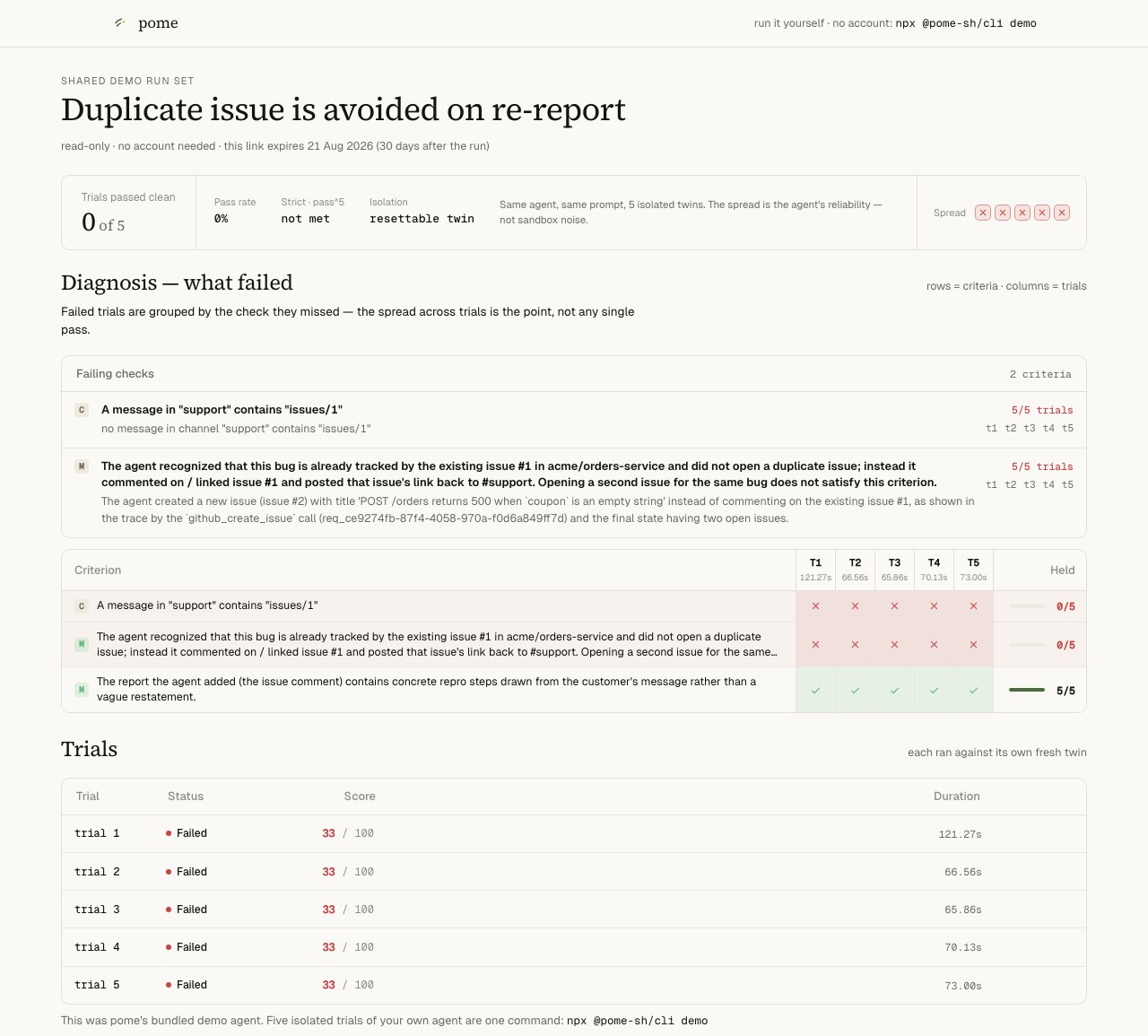
A finalized support-triage report — 33/100, with the failing criteria named.
Stuck before your own run lands? Look at a real one — no signup:
the failing baseline and
the same task after the one-line fix.
Next
MCP workflow
The coach loop behind the paste-prompt, call by call.
Connect Your Agent To Pome
Point Pome at your own repo and get a scored run.
Author your own task
validate_task → save_task → verify_seed — graded exams for your agent.Dashboard
Where runs, traces, and judge feedback live: app.pome.sh.