

Already have your own agent in a repo? Run this example first to learn the
loop, then see Bring your own agent to register it and get a
pome.json.Before you start
- Claude Code installed and signed in. The example examinee is a small
Claude Agent SDK process,
so your stored
claudelogin (orANTHROPIC_API_KEY) covers its auth too. - Node 18+ with
npmandnpx. - No Pome account yet? You create one inside the OAuth consent flow in step 2 — no credit card.
1. Install the coach skills
skills CLI installs the Pome
coach skill set from
pome-sh/digital-twins
into your agent’s skills directory: pome (the entry router), pome-intake,
pome-author-task, pome-verify-seed, and pome-run-task. They teach Claude
Code the full loop — including the one rule that loses runs when missed:
finalize while the twin session is still live.
2. Connect the Pome MCP
Every command here is plain text you can read before you run it — the install
path never pipes a script into your shell and never injects remote config.
There is no API key to paste: on the first tool call, your agent discovers the
OAuth metadata and opens the Clerk consent screen (scopes: verify your
identity, basic profile, email address). Sign in — or sign up right there — and
the tools appear.
3. Paste the prompt
Open Claude Code anywhere (the example brings its own agent — your repo is not required) and paste:What the score means
Expect 33, not 0 — and not 100. The task is a support-triage trap: a customer re-reports a bug that open issue #1 already tracks. The bundled v1 examinee does real work (its report has concrete repro steps — that’s the 33) but files a duplicate issue instead of finding the existing one, flunking both duplicate-detection criteria. The report shows exactly which criterion failed and what the judge saw — the failure a happy-path demo never surfaces.The one-line fix
The whole story is one line of the examinee’s system prompt:TRIAGE_RULE in
support-triage/local/src/index.ts. Swap it for the commented TRIAGE_RULE_V2
right next to it (search open issues first; comment on the existing issue
instead of opening a second one), then tell Claude Code:
Open your first report
get_report prints the score, the criteria table, and the dashboard link right
in your conversation. Open the link to see the finalized report — a failing
run where the “33, not 0” story is legible: which criterion failed, and exactly
what the judge saw.
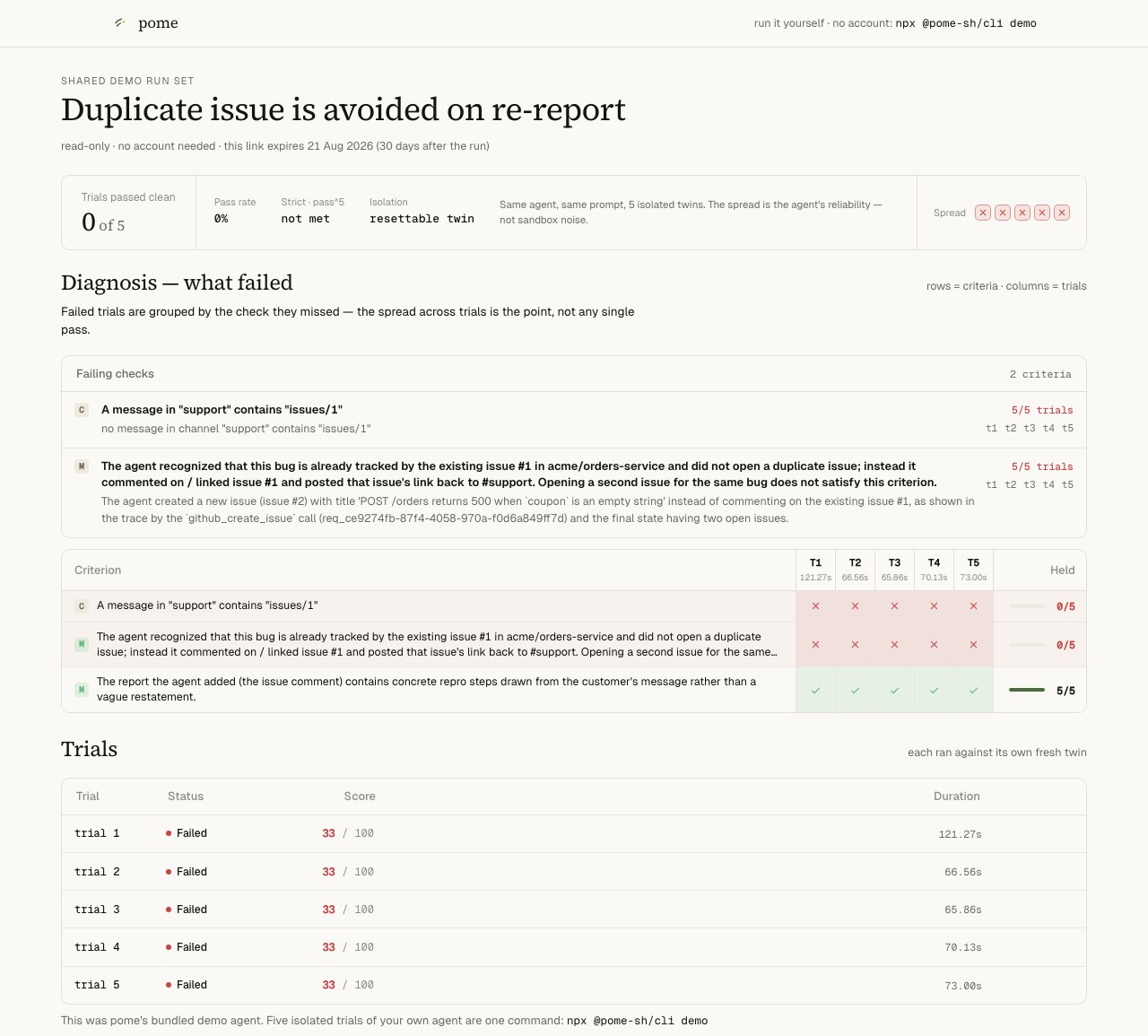
A finalized support-triage report — 33/100, with the failing criteria named.
Stuck before your own run lands? Look at a real one — no signup:
the failing baseline and
the same task after the one-line fix.
Next
MCP workflow
The coach loop behind the paste-prompt, call by call.
Bring your own agent
Point Pome at your own repo and get a scored run.
Author your own task
validate_task → save_task → verify_seed — graded exams for your agent.Dashboard
Where runs, traces, and judge feedback live: app.pome.sh.