> ## Documentation Index
> Fetch the complete documentation index at: https://docs.pome.sh/llms.txt
> Use this file to discover all available pages before exploring further.
# Quickstart — Claude Code
> Paste one prompt into Claude Code and get your first scored agent report — hands off.
Pome gives your agent a graded exam: a clone of it (the **examinee**) works a
real task against deterministic digital twins of GitHub and Slack, every tool
call is recorded, and a judge scores the tape. The agent driving the test (the
**coach** — your Claude Code session) installs, connects, runs, and brings the
failure summary back into the conversation — hands off.
Already have your own agent in a repo? Run this example first to learn the
loop, then see [Bring your own agent](/existing-agent) to register it and get a
`pome.json`.
## Before you start
* **Claude Code** installed and signed in. The example examinee is a small
[Claude Agent SDK](https://docs.claude.com/en/agent-sdk/typescript) process,
so your stored `claude` login (or `ANTHROPIC_API_KEY`) covers its auth too.
* **Node 18+** with `npm` and `npx`.
* No Pome account yet? You create one inside the OAuth consent flow in step 2 —
no credit card.
## 1. Install the coach skills
```bash theme={null}
npx skills add pome-sh/digital-twins
```
The [`skills` CLI](https://github.com/vercel-labs/skills) installs the Pome
coach skill set from
[`pome-sh/digital-twins`](https://github.com/pome-sh/digital-twins/tree/main/skills)
into your agent's skills directory: `pome` (the entry router), `pome-intake`,
`pome-author-task`, `pome-verify-seed`, and `pome-run-task`. They teach Claude
Code the full loop — including the one rule that loses runs when missed:
finalize while the twin session is still live.
## 2. Connect the Pome MCP
```bash theme={null}
claude mcp add --transport http pome https://mcp.pome.sh/mcp
```
Every command here is plain text you can read before you run it — the install
path never pipes a script into your shell and never injects remote config.
There is no API key to paste: on the first tool call, your agent discovers the
OAuth metadata and opens the Clerk consent screen (scopes: verify your
identity, basic profile, email address). Sign in — or sign up right there — and
the tools appear.
## 3. Paste the prompt
Open Claude Code anywhere (the example brings its own agent — your repo is not
required) and paste:
```text theme={null}
Test my agent with pome, using the bundled support-triage example, and take it
all the way to a finalized, scored run — hands off.
First, present me this plan as a short checklist and ask "Shall I proceed?"
before running anything. Wait for my yes.
1. Fetch the example pack and build the local examinee:
npx degit pome-sh/digital-twins/examples/support-triage support-triage
cd support-triage/local && npm install
2. On the pome MCP, call get_started, then get_platform_context with
door: "claude-code" to confirm identity and quota (the door tag is for
onboarding analytics — pass it verbatim).
3. Register the examinee: register_agent with name "support-triage" and
twins ["github", "slack"]. Keep the agent id.
4. Save the exam into my team catalog: save_task with the full contents of
../tasks/duplicate-issue.md as task_source and the name
"support-triage-dedup". Keep the task id.
5. run_task(task_id, agent_id). Keep session_id, agent_token, examinee_task,
and examinee_launch from the response.
6. Spawn the examinee as a local subprocess: from support-triage/local, run
`npm run start` with env injected from the run_task response —
POME_GITHUB_MCP_URL and POME_SLACK_MCP_URL from the github and slack
entries' url in examinee_launch.mcp_servers (not examinee_launch.env,
whose URLs are REST), POME_AUTH_TOKEN = agent_token,
POME_TASK = examinee_task.prompt. POME_AUTH_TOKEN is env-only: never
write it to a file.
7. The instant the process exits, call finalize_run(session_id, agent_token)
— before any cleanup, while the twin session is still live.
8. get_report(run_id). Give me the score, the criteria table, and a plain
summary of what failed and why, here in the conversation, plus the
dashboard link.
Guardrails: pause after the checklist for my go-ahead; keep every command plain
text and show it to me before running; never pipe remote scripts into a shell;
secrets stay in env vars; don't ask me for an API key — the OAuth consent
screen handles auth.
```
Claude Code does the rest: it seeds live GitHub + Slack twins, launches the
examinee against them, waits for it to finish, finalizes, and narrates the
report.
The twin tape lives in the running session. `finalize_run` must be called while
the session is still live — the installed `pome-run-task` skill enforces this,
and the prompt repeats it because it is the one unrecoverable mistake.
## What the score means
Expect **33, not 0 — and not 100**. The task is a support-triage trap: a
customer re-reports a bug that open issue #1 already tracks. The bundled v1
examinee does real work (its report has concrete repro steps — that's the 33)
but files a **duplicate issue** instead of finding the existing one, flunking
both duplicate-detection criteria. The report shows exactly which criterion
failed and what the judge saw — the failure a happy-path demo never surfaces.
## The one-line fix
The whole story is one line of the examinee's system prompt: `TRIAGE_RULE` in
`support-triage/local/src/index.ts`. Swap it for the commented `TRIAGE_RULE_V2`
right next to it (*search open issues first; comment on the existing issue
instead of opening a second one*), then tell Claude Code:
```text theme={null}
Apply the TRIAGE_RULE_V2 fix in support-triage/local/src/index.ts and re-run
the same task (steps 5–8). Show me the score delta.
```
Same exam, same twins, green run. That loop — run, read the failure, fix,
re-run — is the product.
## Open your first report
`get_report` prints the score, the criteria table, and the dashboard link right
in your conversation. Open the link to see the finalized report — a **failing**
run where the "33, not 0" story is legible: which criterion failed, and exactly
what the judge saw.
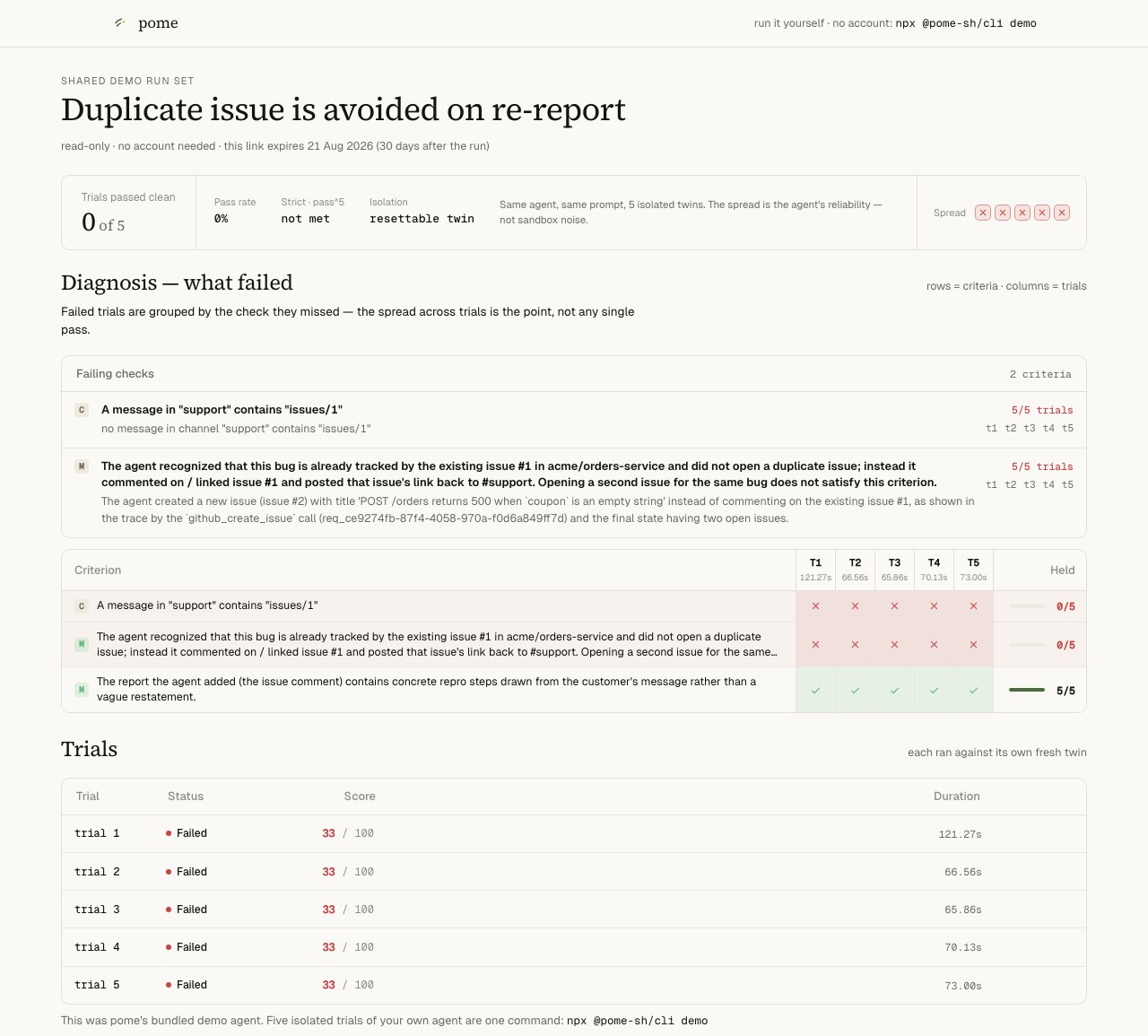 Stuck before your own run lands? Look at a real one — no signup:
[the failing baseline](https://app.pome.sh/demo/grp_-WxylAM068osJlDWYRTihUUP) and
[the same task after the one-line fix](https://app.pome.sh/demo/grp_utwJ34M42NHX64jF170J5iaT).
## Next
The coach loop behind the paste-prompt, call by call.
Point Pome at your own repo and get a scored run.
`validate_task` → `save_task` → `verify_seed` — graded exams for *your* agent.
Where runs, traces, and judge feedback live: app.pome.sh.
Stuck before your own run lands? Look at a real one — no signup:
[the failing baseline](https://app.pome.sh/demo/grp_-WxylAM068osJlDWYRTihUUP) and
[the same task after the one-line fix](https://app.pome.sh/demo/grp_utwJ34M42NHX64jF170J5iaT).
## Next
The coach loop behind the paste-prompt, call by call.
Point Pome at your own repo and get a scored run.
`validate_task` → `save_task` → `verify_seed` — graded exams for *your* agent.
Where runs, traces, and judge feedback live: app.pome.sh.